-
Shop
- Adidas
- Advanced Technologies
- AI Skills Mastery 2026 Collection
- Apple Accessories
- Armani
- Best-Sellers
- Calvin Klein
- Car Accessories
- Clothing
- Dating & Social Skills
- Digital Resources
- Beauty
- Budgeting & Saving
- Car Buying & Ownership
- Cozy Feast Collection
- Emotional Intelligence
- Entrepreneurship & Business Growth
- Financial Education
- Financial Independence
- Financial Mindset & Psychology
- Goal Setting
- Hobbies
- Leadership
- Mindfulness
- Motivation
- Parenting & Child Development
- Personal Style & Fashion
- Pet Lifestyle & Wellness
- Positive Thinking
- Self Confidence
- Sleep Improvement
- Stress Management & Relaxation
- Travel Planning
- Yoga & Fitness
- Yoga & Mind-Body Practices
- Education & Learning
- Family & Parenting
- Fashion
- Accessories
- Alexander McQueen
- Bags
- Bags & Wallets
- Balenciaga
- Belts
- Blazers
- Blouses & Shirts
- Bottega Veneta
- Brunello Cucinelli
- Burberry
- Chanel
- Chloé
- Dior
- Dolce & Gabbana
- Dresses
- Etro
- Fendi
- Gucci
- Hats & Hair Accessories
- Hoodies & Sweatshirts
- Jacquemus
- Jewelry
- Jil Sander
- Jimmy Choo
- Kiton
- Luggage
- Luggage Bags
- Miu Miu
- Off-White
- Prada
- Rick Owens
- Saint Laurent
- Scarves
- Shoes
- Socks & Tights
- Sunglasses
- Sweaters & Cardigans
- The Row
- Tom Ford
- Tops & Shirts
- Valentino
- Valentino Garavani
- Versace
- Vivienne Westwood
- Watches
- Fashion Accessories
- Gadgets
- Guess
- Health & Beauty
- Health & Wellness
- Home & Garden
- Home Supplies
- Kids & Babies
- Kitchen Best-Sellers
- Luxury Brands Collection
- Nike
- Online Business for Beginners
- Patio, Lawn & Garden
- Personal Growth
- Pet Care
- Pet Supplies
- Pets
- Smart Home Living Guides
- Sport & Outdoors
- Super Deals
- TikTok Growth & Monetization Mastery
- Travel
- Wealth
- Wealth Building
- Popular
- Best deals
2Pcs Wrist Rest Set for Keyboard & Mouse Comfort
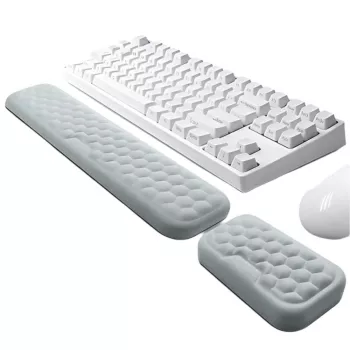
2Pcs Ergonomic Mouse & Keyboard Wrist Rest Set: Daily Comfort for Desk Work
Long hours at a desk can leave wrists feeling tired or compressed, especially with repetitive mouse and keyboard use. A supportive wrist rest set helps keep contact pressure more evenly distributed and encourages a more neutral, relaxed setup for everyday computing—at home, at the office, or in a study space. The goal isn’t to “fix posture” overnight; it’s to make the surfaces your hands touch feel less harsh, so typing and mousing stay comfortable during the work you already do.
What’s Included and Who It’s For
This two-piece wrist rest set is designed to cover the two most common contact points on a desk: the keyboard zone and the mouse zone. You get one longer pad meant to sit in front of your keyboard and one smaller pad intended for your mouse hand.
- Two-piece set for both keyboard and mouse use: one longer pad for the keyboard area and one smaller pad for the mouse area.
- Useful for frequent typing, spreadsheets, design work, gaming sessions, or study blocks.
- Helpful if you feel strain from sharp desk edges, firm tabletops, or extended wrist contact points.
- A practical add-on for home offices, student desks, and shared workstations where comfort upgrades need to be simple.
If your wrists tend to rest on a hard desk edge or you notice pressure marks after a long session, adding a cushioned transition between your hands and the desk can make a noticeable difference in day-to-day comfort.
Comfort and Ergonomics Basics (Without Overcomplicating It)
Ergonomics can get technical, but the basics are straightforward: keep joints in a neutral range, reduce contact pressure, and avoid holding one position for too long. Agencies like NIOSH and OSHA emphasize workstation setup and fit to reduce unnecessary strain during computer work.
- Aim for a neutral wrist position: wrists should feel supported without being bent sharply up, down, or sideways.
- Let the forearms do most of the movement: a wrist rest should reduce hard pressure, not “lock” the wrist in place.
- Keep shoulders relaxed and elbows roughly at a comfortable right angle; adjust chair height first, then keyboard and mouse placement.
- If tingling or numbness occurs, reduce pressure, take breaks, and reassess posture and desk height. For ongoing symptoms, review reputable medical guidance such as the Mayo Clinic overview of carpal tunnel syndrome.
Quick setup checks for a more comfortable desk
| Setup element | Goal | Easy adjustment |
|---|---|---|
| Chair height | Forearms roughly level with desk | Raise/lower chair; add footrest if needed |
| Keyboard position | Wrists not bent upward | Move keyboard closer; keep it flat or slightly negative tilt |
| Mouse position | Elbow stays near the body | Bring mouse closer; avoid reaching forward |
| Wrist rest use | Reduce hard edge pressure | Rest palms lightly between actions; avoid pressing down while typing |
Desk Fit: Placement Tips for Keyboard and Mouse Pads
Small placement changes can matter as much as the pad itself. Think “close, centered, and relaxed” rather than perfectly symmetrical.
- Position the keyboard pad so the “heel” of the palms can rest comfortably before typing and during pauses.
- Keep the mouse pad aligned with mouse height and close enough that the arm doesn’t reach or flare outward.
- For compact desks, place the keyboard slightly more centered and angle the mouse zone to reduce shoulder strain.
- If switching between laptop and external keyboard, keep the wrist rest paired with the device used most often to maintain consistency.
A simple test: with your hands on the keyboard and mouse, your shoulders should feel dropped (not raised), and your elbows should feel naturally close to your sides. If you’re reaching, bring your input devices closer before adjusting anything else.
When a Wrist Rest Set Helps Most
Wrist rests aren’t only for intensive office jobs. They can help in any setup where the desk surface is unforgiving or where repetitive movement is part of the routine.
- Desk edges feel sharp or leave pressure marks after typing or mousing.
- The mouse hand feels more fatigued than the keyboard hand after extended use.
- Work involves frequent cursor movement (editing, CAD, gaming, multi-monitor workflows).
- A more cushioned contact surface is needed for comfort during long sessions, especially in cooler or harder-surfaced work areas.
Care, Cleaning, and Keeping It Feeling New
Product Details and Where to Get It
If you’re ready for a straightforward comfort upgrade, the 2Pcs Ergonomic Mouse & Keyboard Wrist Rest Set is an easy way to add cushioning for both hands without changing your entire setup. It’s a practical pick for home office refreshes, student workspaces, and work-from-home routines where the desk gets used every day.
At-a-glance product info
| Item | Details |
|---|---|
| Name | 2Pcs Ergonomic Mouse & Keyboard Wrist Rest Set |
| Price | $17.51 |
| Availability | In stock |
| Link | View product page |
More in-stock picks to round out your workspace
- Men’s Genuine Leather Belt with Solid Brass Buckle (a durable everyday accessory)
- Elegant Autumn Short Blazer for Women (a polished layer for office days)
- Mini Golf Beginner’s Checklist (Printable Digital) (a quick, fun off-screen break idea)
FAQ
Should wrists rest on the pad while typing?
Use light contact mainly during pauses or between actions. While actively typing, try not to press down continuously; keep wrists neutral and shoulders relaxed so your forearms do most of the work.
Will a wrist rest set fit any keyboard and mouse?
Most standard keyboards and mice will work because placement is flexible. Align the longer pad along the front edge of the keyboard and keep the mouse pad close so you don’t have to reach.
How do you clean a wrist rest without damaging it?
Wipe with a soft cloth and use mild soap and water when needed. Avoid strong chemicals, and let it air-dry completely before placing it back on your desk.
Recommended for you

Four-Leg Winter Pet Jumpsuit: Fit, Warmth & Lace
Jul 6, 2026













Leave a comment